Most business websites have accessibility problems that a free tool could find in under a minute. In WebAIM’s February 2026 scan of the top one million home pages, 95.9% had detected WCAG 2 failures, an average of 56.1 errors per page, and the numbers got worse compared with 2025.
That is a usability problem before it is a legal one. A form a screen reader can’t label, a button with no name, or grey-on-white text that’s hard to read all stop real people from buying, booking or asking for a quote.
This guide gives you a website accessibility checklist built for businesses rather than for compliance teams. It tells you what to fix first, what tools will and won’t catch, and how to run a practical accessibility audit on the pages that matter most.
Not legal advice. Accessibility law differs by country and sector. This article explains the technical standard and public guidance; speak to qualified counsel about your specific obligations.
What WCAG 2.2 Is (and Why It’s the Standard to Check Against)
The Web Content Accessibility Guidelines (WCAG) are published by the W3C. Version 2.2 became a W3C Recommendation on 5 October 2023, and the W3C notes that it is also approved as the international standard ISO/IEC 40500:2025.
WCAG is organised around four principles: content must be perceivable, operable, understandable and robust. Each guideline contains testable “success criteria” at three levels: A (minimum), AA (the level most laws and contracts reference) and AAA (enhanced).
For most business websites, WCAG 2.2 Level AA is the sensible target. It is backwards-compatible: a site that meets 2.2 AA also meets 2.1 AA, which is the version several regulations still cite.
What changed in WCAG 2.2
WCAG 2.2 added nine success criteria and removed one (4.1.1 Parsing, now obsolete). Six of the additions are at Level A or AA, which means they belong on your checklist:
| New criterion | Level | What it means for a business site |
| 2.4.11 Focus Not Obscured (Minimum) | AA | Sticky headers, cookie banners and chat widgets must not completely hide the element a keyboard user is on. |
| 2.5.7 Dragging Movements | AA | Anything that needs dragging (sliders, kanban cards, map pins) needs a click/tap alternative. |
| 2.5.8 Target Size (Minimum) | AA | Buttons and links need a target of at least 24 × 24 CSS pixels, or enough spacing around them. |
| 3.2.6 Consistent Help | A | If you offer help (phone, chat, contact link), put it in the same place on every page. |
| 3.3.7 Redundant Entry | A | Don’t make users retype information they already gave in the same process (e.g., billing = shipping). |
| 3.3.8 Accessible Authentication (Minimum) | AA | Logins can’t rely solely on memory or puzzle tests; allow password managers and paste. |
Source: W3C, “What’s New in WCAG 2.2”.
Why Accessibility Matters Commercially in 2026
There are three practical reasons a business should care, and only one of them is legal.
First, it removes friction from conversion paths. Missing form labels, empty buttons and low contrast are the same issues that make forms and checkouts harder for everyone, including mobile users in bright sunlight. Our article on how UI/UX design affects conversions and retention covers why clear interaction states and readable text matter to revenue.
Second, regulation is expanding across markets. If you sell to customers in more than one region, you’ll likely meet more than one framework:
| Market | What applies (summary) | Status in 2026 |
| European Union | The European Accessibility Act (Directive (EU) 2019/882) covers services including e-commerce and banking. | Applies from 28 June 2025; microenterprises providing services (fewer than 10 staff and ≤ €2m turnover or balance sheet) are exempt from the service requirements. |
| United States — public sector | The DOJ’s ADA Title II rule requires state and local government web content to meet WCAG 2.1 AA. | An April 2026 interim final rule moved deadlines to 26 April 2027 (population 50,000+) and 26 April 2028 (smaller entities). |
| United States — private businesses | ADA Title III applies to businesses open to the public; the DOJ has issued web accessibility guidance rather than a specific technical rule. | Lawsuits continue; WCAG is the benchmark most commonly referenced. |
| India | In Amar Jain v. Union of India (30 April 2025), the Supreme Court held that the right to digital access is part of the right to life under Article 21. | Directions include accessible digital KYC for regulated entities, government or private, and WCAG 2.1 for government websites (LiveLaw report). |
Source for EU row: Directive (EU) 2019/882, EUR-Lex and the European Commission’s EAA page.
Third, shortcuts can backfire. In April 2025, the US Federal Trade Commission finalised an order requiring accessiBe to pay $1 million after alleging it claimed its accessWidget plug-in could make any website WCAG-compliant without adequate evidence. The lesson for buyers is simple: a script added to your site does not replace fixing the underlying code, design and content.
Start Here: The Six Failures Behind 96% of Detected Errors
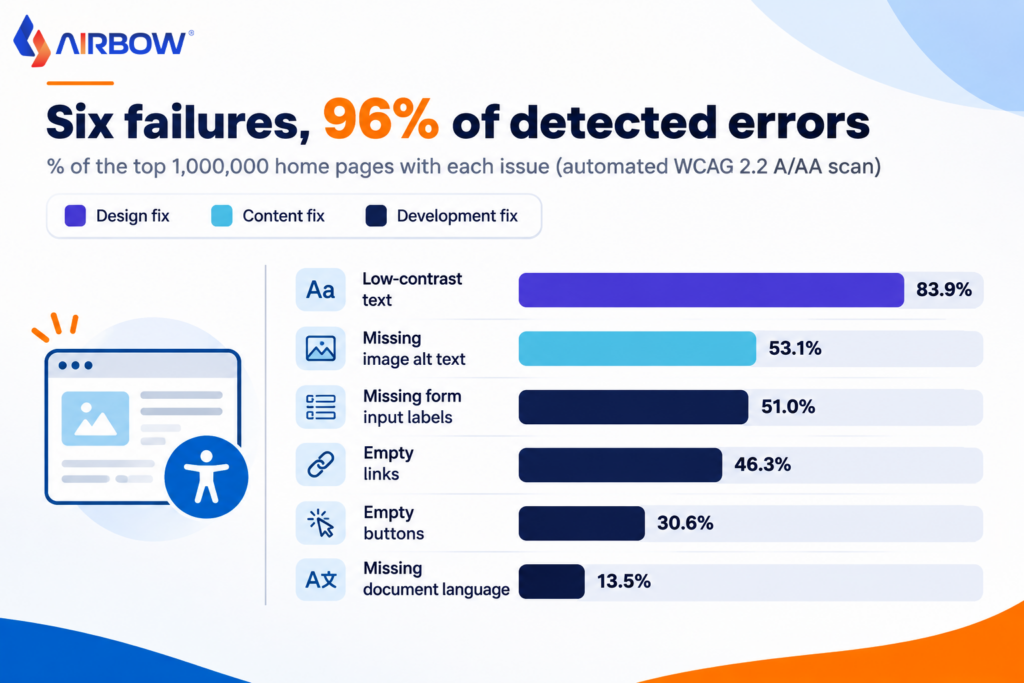
WebAIM found that six issue types accounted for 96% of all automatically detected errors in 2026. That makes them the highest-return starting point for any business website accessibility checklist.
| Failure type | Share of home pages affected (2026) | Who usually fixes it? | Quick test |
| Low-contrast text | 83.9% | Design | Check text against a 4.5:1 ratio (3:1 for large text). |
| Missing image alt text | 53.1% | Content / CMS | Inspect images; informative ones need meaningful alt text, decorative ones empty alt (alt=""). |
| Missing form input labels | 51.0% | Development | Click each field’s visible label; focus should move to the field. |
| Empty links | 46.3% | Development | Icon-only links (social icons, logos) need an accessible name. |
| Empty buttons | 30.6% | Development | Icon buttons (search, close, hamburger menu) need text or aria-label. |
| Missing document language | 13.5% | Development | Confirm <html lang="en"> (or the right language code) is set. |
Data: WebAIM Million 2026. These figures come from automated scanning with the WAVE engine, so they show what tools can detect, not everything that is wrong.
Most of these are inexpensive to fix in a theme or design system. Fixing a missing label once in a reusable form component, for example, fixes it on every page that uses it.
The Practical WCAG 2.2 Website Accessibility Checklist
Use the checklist below on your highest-value pages first. It is grouped by who usually owns each item, so you can split the work across design, development, and content.
Design checklist
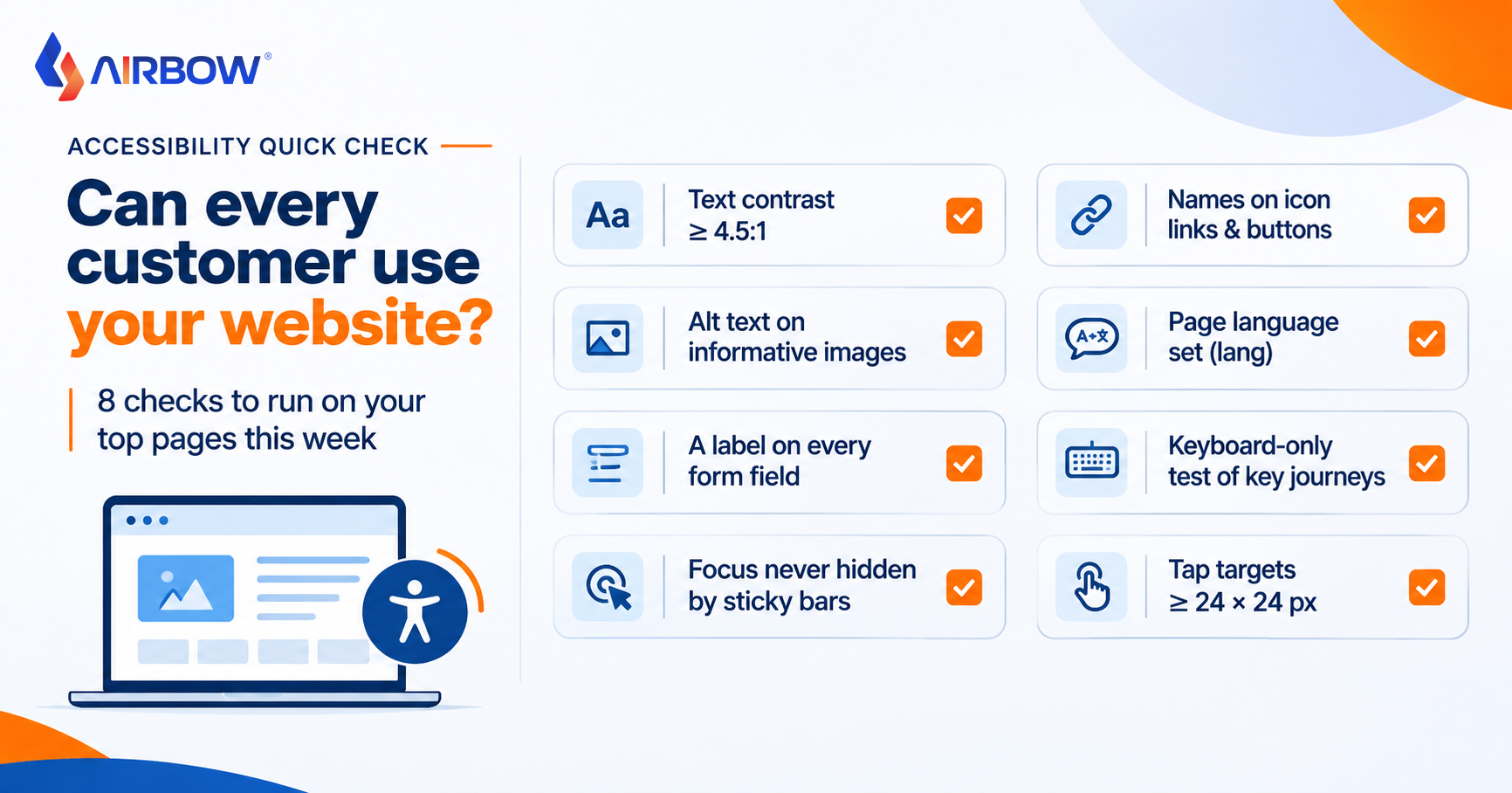
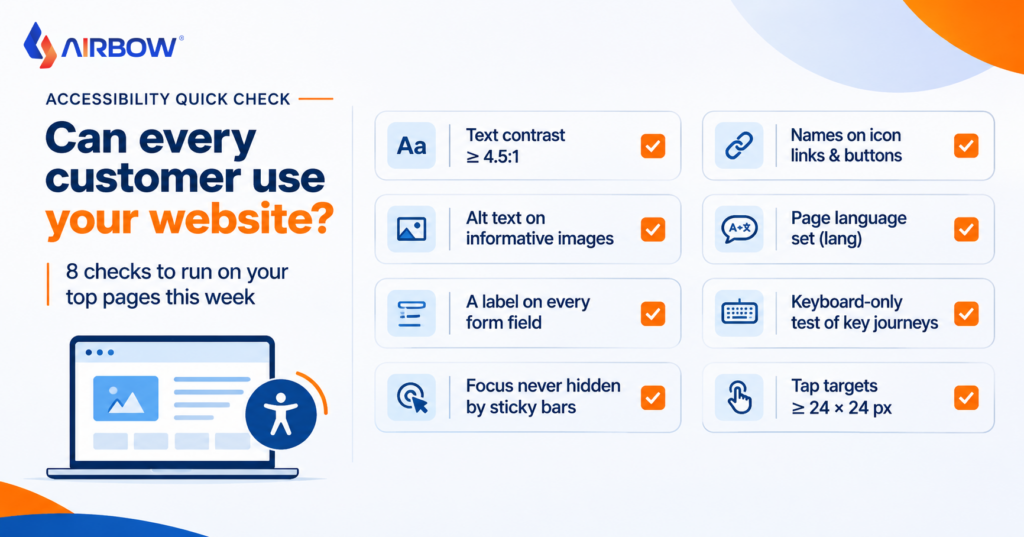
- Colour contrast: body text meets 4.5:1; large text and essential icons meet 3:1.
- Don’t rely on colour alone: error states, required fields and links use text or icons as well as colour.
- Visible focus: every interactive element shows a clear focus indicator when reached by keyboard.
- Target size: buttons, links and form controls are at least 24 × 24 CSS pixels or adequately spaced (WCAG 2.2, 2.5.8).
- Consistent help: contact, phone or chat links appear in the same place on every page (3.2.6).
- Readable layout: content reflows at 320 CSS pixels wide and at 200% zoom without horizontal scrolling.
Development checklist
- Keyboard access: every menu, modal, accordion, carousel and form can be used with Tab, Shift+Tab, Enter, Space and arrow keys.
- Focus not obscured: sticky headers, cookie banners and chat widgets don’t hide the focused element (2.4.11).
- Semantic structure: one H1, logical heading order, landmarks (
header,nav,main,footer). - Form labels and errors: every field has a programmatic label; errors are described in text and announced.
- Accessible names: icon-only links and buttons have names a screen reader can read.
- Page language:
langattribute set on the<html>element. - Dragging alternatives: sliders and drag-and-drop interfaces offer a single-pointer alternative (2.5.7).
- Accessible login: password managers and paste work; no memory-only puzzles (3.3.8).
Content checklist
- Alt text: informative images described concisely; decorative images marked decorative.
- Descriptive links: avoid “click here”; the link text says where it goes.
- Video and audio: captions for video; transcripts for audio-only content.
- Documents: downloadable PDFs are tagged and readable, or offered in an accessible HTML alternative.
- Plain language: short sentences, explained jargon, clear instructions on forms.
- No repeated entry: multi-step forms reuse information the user already provided (3.3.7).
How to Run a Practical Accessibility Audit
A full conformance audit tests every WCAG criterion across a representative sample of pages. A practical business audit can start smaller and still find the problems that block customers.
1. Pick the journeys that make money
List the five to ten pages and flows that matter most: home page, top service or product pages, contact or quote form, checkout, login and booking. Audit these before blog posts or archive pages.
2. Run automated scans, but know their limits
Free tools such as WAVE and Lighthouse’s accessibility audit will catch the six common failures above quickly. Treat the results as a starting list, not a pass mark.
Automated testing finds a meaningful share of issues, but not all of them. Deque, which sells the axe testing tools, analysed nearly 300,000 issues from over 2,000 audits and reported that automated tests found 57% of issues by volume. Even on that vendor’s own data, roughly four in ten issues needed a human to find them. WebAIM makes the same point: no detected errors does not mean a page is accessible.
3. Test with a keyboard
Unplug the mouse and use Tab to move through each key journey. Can you reach and operate every link, menu, field and button? Can you always see where you are? Can you close the cookie banner and the chat widget?
This 10-minute test catches many issues automated tools miss, such as focus traps in modals and menus that only open on hover.
4. Test with a screen reader
Use NVDA (free, Windows) or VoiceOver (built into macOS and iOS) to complete your main form or checkout. Listen for unlabeled fields, buttons announced only as “button”, and error messages that are never read out.
5. Check zoom, reflow and mobile
Zoom the browser to 200% and narrow the window to phone width. Text should remain readable and no content should be cut off or require sideways scrolling.
6. Prioritise and fix by severity
Rank each issue by impact: does it block a task (can’t submit the form), hinder it (confusing error messages) or inconvenience the user (minor contrast issue)? Fix blockers on revenue journeys first, then fix the shared components (header, footer, form styles) that repeat across the site.
7. Prevent regressions
Add automated accessibility checks to your release process, include accessibility in design reviews, and re-test key journeys after each major change. Building accessibility into a web development and QA workflow is cheaper than repeated clean-up projects; independent software testing can include accessibility checks in regression cycles.
Common Mistakes to Avoid
Relying on an overlay widget. Toolbars that let users change font size or contrast can be helpful extras, but they don’t repair missing labels, broken keyboard access or inaccessible components in your code.
Treating a Lighthouse score of 100 as proof. Automated scores only reflect automated checks. Manual keyboard and screen-reader testing remain essential.
Fixing pages instead of components. If the same issue appears on 200 pages, the fix belongs in the theme, template or design system.
Forgetting third-party content. Booking widgets, embedded forms, payment pages and chat tools are part of your user’s journey. Ask vendors for an accessibility conformance report (often called a VPAT or ACR).
Leaving it until a redesign. Most of the six common failures can be fixed on your current site. Accessibility should also be a requirement in any upcoming redesign brief.
Frequently Asked Questions
What is a website accessibility checklist?
A website accessibility checklist is a list of checks, usually based on WCAG, that helps you confirm people with disabilities can perceive, navigate and use your website. A useful checklist groups items by owner (design, development, content) and includes both automated and manual tests.
Is WCAG 2.2 legally required?
It depends on where you operate and your sector. Many laws and procurement rules reference WCAG 2.1 AA, and some are updating to 2.2. Because WCAG 2.2 AA includes all 2.1 AA requirements, targeting 2.2 AA is a practical way to cover both. Confirm your specific obligations with legal counsel.
How long does a website accessibility audit take?
A focused audit of five to ten key pages and journeys can often be completed in days; a full conformance audit of a large site with complex applications takes longer. Scope depends on the number of unique templates, interactive components and third-party tools.
Can an accessibility plug-in make my website compliant?
No plug-in can guarantee compliance on its own. The FTC’s 2025 order against accessiBe specifically concerned claims that an automated tool could make any website WCAG-compliant. Fixing the underlying design, code and content is the reliable route.
Does accessibility help SEO?
Accessibility and SEO overlap in practice: descriptive headings, meaningful link text, alt text and clean HTML help both people and search engines understand a page. However, accessibility should be done for users first; it is not a guaranteed ranking factor. Our SEO services cover the technical side of on-page structure.
Make Accessibility Part of How Your Website Is Designed and Built
Accessibility works best when it’s a design and engineering habit, not a one-off audit. Start with the six common failures on your highest-value pages, test key journeys with a keyboard and a screen reader, then build the fixes into your components so they stay fixed.
If you’re planning a redesign or want help reviewing your site’s key journeys, Airbow’s UI/UX design team works from research through to development-ready handoff. Contact us to discuss your website.